Select many alarms at once
Select as many alarms as you like and turn them off, turn them on, move, duplicate, skip or delete them, all at once. Delete has Undo.
Free
An alarm clock app built for people with many alarms, plus the rest of the clock. Every feature shows whether it's free, an add-on or Premium.
Coming soon on Google Play
See prices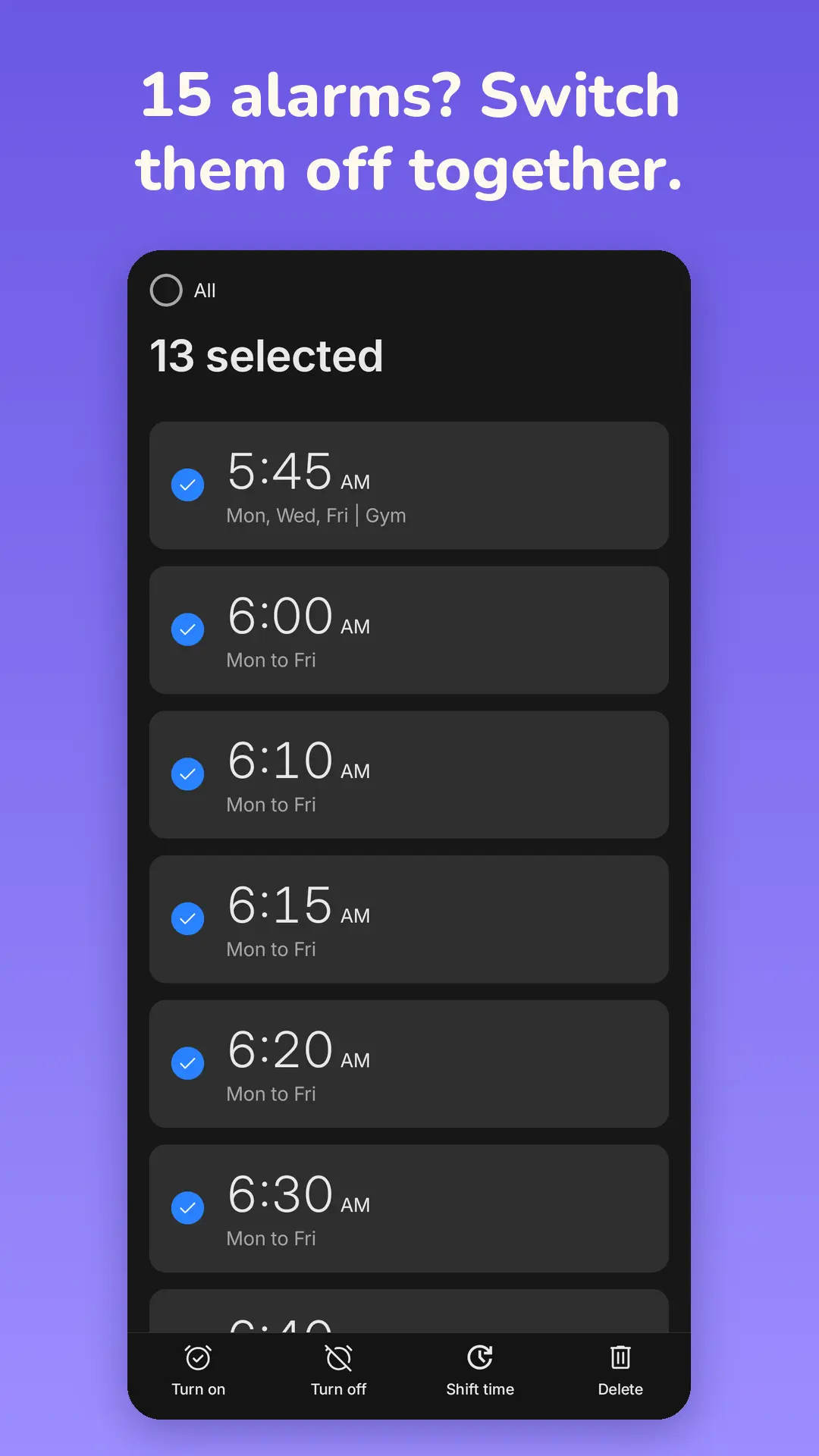
Select as many alarms as you like and turn them off, turn them on, move, duplicate, skip or delete them, all at once. Delete has Undo.
Up before your alarms? Tap I'm up on the ringing screen and Bell Buddy stays quiet for the next 2 hours, or 1, 3 or 4 if you pick. Tomorrow your alarms ring as normal.
Move alarms by anything from 1 minute to 12 hours, like every alarm 15 minutes later or an hour earlier. With Undo.
Skip today's or tomorrow's alarms in one go.
Skip only the next time an alarm would ring. The alarm itself stays as it is.
Pause your alarms for a time window, like nothing between 6:00 and 8:00 on Saturday.
Set the dates ahead of time, and your alarms come back by themselves when it's over.
Skipping never changes your alarm settings, and a banner at the top lets you undo it.
If you switched alarms off in the last 14 days and one of your usual alarm days now has nothing set to ring, an evening notice tells you. Turn on brings them back in one tap.
A notification before an alarm rings, so you can skip it straight from there. It comes 15 minutes before by default; turn it off or set it from 10 minutes to 2 hours.
Need an alarm every 10 minutes from 6:00 to 7:30? An alarm series creates them all at once and keeps them on one card with one switch. You can still turn single alarms on and off.
Copy an alarm instead of setting it up again from scratch.
Start new alarms from a template instead of from scratch.
From the alarm list, set a one-off alarm in hours and minutes from now, or tap a preset like 30 minutes, 2 hours or 8 hours.
Apps and assistants that use Android's standard commands can set, show, snooze and dismiss alarms and start timers in Bell Buddy. Your phone decides which clock app its assistant uses.
Tap the mic and just say "skip tomorrow", "vacation from Monday to Friday", "turn off my 6:30 alarm" or "wake me in 20 minutes". Bell Buddy shows what it understood and waits for you to tap Do it. Tap to talk, not hands-free.
For when your week isn't Monday to Friday: repeat an alarm on a rotation of 2 to 28 days.
Pick the days of the week an alarm repeats on.
An alarm that rings just one time.
Set an alarm for a date you choose, like the first day of a new shift.
Bell Buddy rings on time when your phone is asleep, after a restart, after updates and after a time change.
If something on your phone might get in the way, Bell Buddy tells you how to fix it, with Fix now.
An alarm that goes off during a phone call starts with vibration and a short, soft tone every few seconds. When the call ends, it rings in full.
When an alarm rings with no answer, it snoozes by itself once the ring time runs out. With no snoozes left, it stops and you get a Missed alarm notification.
See your alarms from the last 14 days.
Set the snooze length and how many times you can snooze. Snoozes can get shorter each time.
Give each alarm its own volume.
Choose what the volume buttons do while an alarm rings: Snooze, Dismiss or Do nothing.
Choose whether an alarm plays on the speaker or in your headphones.
When it's on and your battery is under 20 %, alarms ring with sound and the ringing screen only.
Solve easy, medium or hard problems, 1 to 5 in a row, before the alarm lets you go.
Stuck on a challenge? After a minute, "Already up? Use your wake-up pass" lets you through. On by default.
A few minutes after you turn off the alarm, Bell Buddy asks "Still awake?". No answer within 2 minutes, and the alarm rings again. Off by default.
Type a phrase, Shake, Memory tiles, Scan a code and Steps, plus every challenge added later.
After your last snooze, every further ring plays a sound you pick, like one of the Loud alarms, at the alarm's own volume, with no slow build-up. You can still snooze.
The flashlight flashes while the alarm rings, up to 2 times a second.
More vibration patterns, at Low, Medium or High strength on phones that support it.
Starts soft and builds up.
Loud alarms, gentle tones and music, your phone's own sounds, or your own files.
A sunrise on the screen before the alarm rings.
Bell Buddy can read out the time and the alarm name.
The screen flashes while the alarm rings.
Four vibration patterns to choose from, with a preview.
Bell Buddy, our little mascot, can wave you awake on the ringing screen. The plain ring screen is the default.
Pick an app that opens by itself when you turn off the alarm.
Add cities with an offline search.
Keeps counting after the app closes.
Save the timers you use, and when one goes off it keeps counting, so you can see how long ago that was.
Run more than one timer at the same time.
2 timers at once free, up to 10 with Premium
A clock for your bedside table that can go darker than your phone's lowest brightness and shifts a few pixels every minute against burn-in. It can start by itself while your phone charges (off by default; on some phones you get a "Charging. Open the night clock?" notification instead).
The next-alarm widget has Skip next and Skip day. Backgrounds can be solid, faded or see-through.
A Bell Buddy tile for Quick Settings.
Both are part of the free app.
Dark blue, Pink light, AMOLED, Pink dark and Material You.
Digital and analog clock faces.
One digital and one analog face free, more with Premium
Landscapes and Bell Buddy scenes at the top of the app.
No account and no sign-in. Your alarms stay on your phone.
Back up to your Google account.
Export to a file, and import it again.
Bell Buddy is in English and Norwegian (bokmål).
Made for phones, tablets and foldables.
Runs on Android 10 and newer.
Bell Buddy is free on Android 10 and up, with one small banner ad.
Coming soon on Google Play
Compare plans